
Welcome to Git: Commit Amend - Basic (Java).

This question is used to evaluate your skills on creating a new branch and pushing it to remote in Git.

For this, you will be evaluated based on the following operations. The remote repository has been pre-configured into your local git repository.

  1. Your local git repository will be linkedlist_java.
  2. Push the master branch of local git repository to the remote repository.
  3. Create a new branch with the name new_branch.
  4. Make a change to the Java program file (do not remove it), make a commit and push the branch.
  5. Amend the commit to change the commit message. Optionally, you can push it to remote.

Note 1: Do not miss out to run Project -> Install.

Note 2: The branch names must not be mis-spelt.

Note 3: The IDE's Git will not work in the local repository. Use Terminal for it.


-----------------------------------------------------------------------------------------------------------------


This is a numpy exercise to manipulate data from csv.

You have to create a NumPy array by reading data from data.csv. data.csv 

1.Create a numpy array by reading the 1st column from data.csv
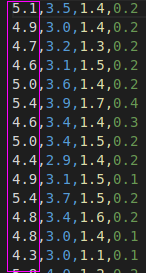


2. Create another numpy array with elements which depends on your previously created numpy array ie if the element is greater than 5.5 make the element as 1.0 else 0.0

just like the second column shown above

3. stack the two arrays you created like this
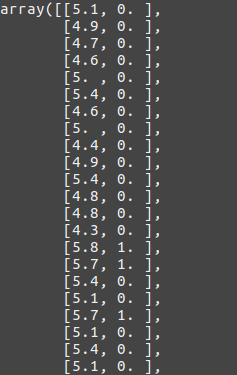


4. Write the stacked numpy array to result.csv also returns the numpy array in the function.


Comments

  1. Answer is available for Git: Commit Amend - Basic (Java)????
    If please share with me.

    ReplyDelete

Post a Comment

Popular posts from this blog

Python Hacker Rank Question and Answer -- Hands-on - Range

Python - Range1   Define a function called ` rangefunction ` which takes three parameters . The first parameter is ` startvalue ` , the next parameter is ` endvalue` and the last parameter is 'stepvalue' .   The function definition code stub is given in the editor. Generate the squares of numbers from ` startvalue ` to ` endvalue ` using range   based on condition given below:   Print the values which must be separated by tab spaces. Note: startvalue and endvalue both are inclusive in the range.    Constraints 1 ≤ startvalue Input Format for Custom Testing   In the first line  startvalue given In the second line endvalue given In the second line stepvalue given     Sample Case 0   Sample Input STDIN      Function -----      -------- 2       → startvalue = 2 9 → endvalue = 9 2 → ...

Python Hacker Rank Question and Answer -- Hands-on - Namespaces

  Python - Namespaces Write the function definition for the function  ' Assign ' to assign the different types of variables in its parameters to new variables. Parameters: 1.An INTEGER in the variable ' i ' 2.A FLOAT in the variable ' f ' 3.A STRING in the variable ' s ' 4.A BOOLEAN in the variable ' b '   New Variables to be assigned with : 1.An INTEGER in the variable ' w ' 2.A FLOAT in the variable ' x ' 3.A STRING in the variable ' y ' 4.A BOOLEAN in the variable ' z '   Assign the parameter variables  Respectively . and Print these in the following order: 1.w 2.x 3.y 4.z 5.Display all the objects defined in the current namespace by using the 'dir' function   Input Format for Custom Testing: # In the first line, value for ' i ' # In the second line, value for ' f ' # In the third line, value for ' s ' # In the fourth line, value for ' b '   Sample Test Case 1:   Sampl...

Python Hacker Rank Question and Answer

Python Question And Answers  Question : Python - Get Additional Info   Define a function called ` docstring `  which takes one parameter .  The  parameter 'function-name' is a  Python  built-in function  name.   The function definition code stub is given in the editor. Generate a  Docstring of the input function  based on the condition given below:   The Docstring must give the maximum information about the function.     Constraints Input must be a string. Input Format Format for Custom Testing   In the input, any python built-in function is   given as a string.     Sample Case 0   Sample Input STDIN      Function -----      -------- print   → functionname = print Sample Output: Help on built-in function print in module builtins: print(...) print(value, ..., sep=' ', end='\n', file=sys.stdout, flush=False) Prints the values to a stream...